Does the following sound familiar?
"The new feature is live."
"I can't see it."
"Have you cleared your browser
cache?"
"Yes. It's still not visible."
"Hmmm…"
This could happen when there are multiple layers of caching in play and one of them has not expired. If you've used something like Cloudflare CDN, you've likely ran into this.
What is Browser Caching?
Let's say your website has a logo in the header and it appears on all pages. When users land on your website and start browsing, they'll be downloading the same logo on every page load. This inefficiency increases bandwidth costs and load times.
When sending the logo to the user, your server can also provide the Cache-Control response header with an expiration value like max-ssage=604800. This will tell the browser to store the logo locally, on the user's hard drive, for 604800 seconds, which is 7 days. Until that time passes, whenever your website references the logo through the same URL, the user's browser will use its cached version. After that, the browser will request the logo from your server once again and cache it for another 7 days.
What is an Edge?
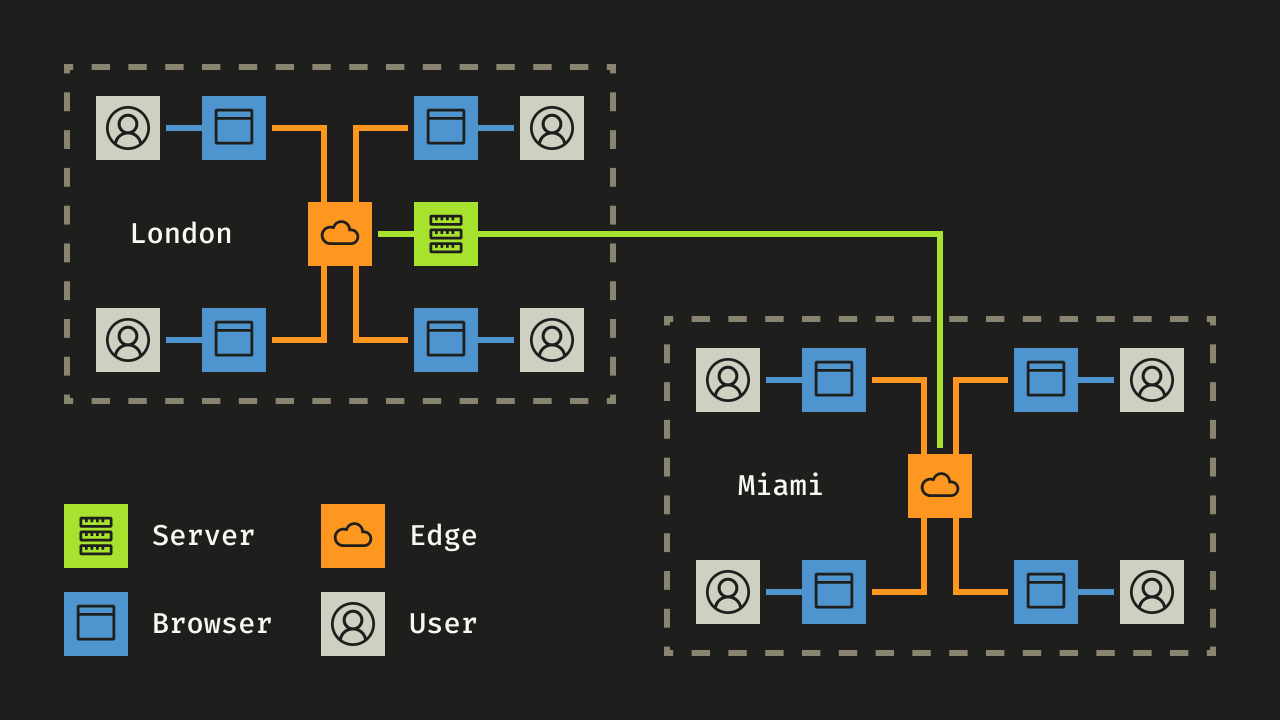
If your audience is mainly European, it would probably make sense to put your server in London, for example. But if your website starts receiving traffic from America, those requests would have to travel an entire ocean, which can make them several times slower, due to latency. With a CDN, you have a system of servers spread throughout the world that proxy user traffic to your server and solve this performance issue.
Among the hundreds of servers in a CDN, the geographically closest one to a user is called an edge and is the one that this user's browser directly communicates with: